
Choose AI marketing agents when you want your assistant to carry out approved work in connected marketing accounts; choose manual marketing when you want to execute each action yourself. The deciding factor is not the quality of the chat response—it is whether the software can perform your task with the access and control you require.
- AI marketing agents vs manual marketing is a choice about execution, permissions, and accountability—not just writing suggestions.
- Groas connects existing assistants to marketing accounts; evaluate it for work you want performed, not advice alone.
- Manual marketing keeps execution with you but requires moving findings and decisions between separate tools.
- Treat reading, requested changes, and optional ongoing autonomy as separate buying decisions.
AI marketing agents vs doing the work across separate tools
Manual marketing makes you the connection between your tools. You inspect an account, interpret what happened, decide what to change, make the change, and check the result. An assistant that only provides advice leaves that execution work with you.
A connected agent changes who performs an authorized action. You still need to define the objective, check the scope, and decide which decisions to delegate. For a 2026 buying decision, compare the actual workflow rather than the label on the software.
| Approach | Best for | What you do | Main advantage | Main limitation |
|---|---|---|---|---|
| Manual marketing | Owners who want direct execution control | Read reports, decide, edit accounts, verify changes | You inspect and execute each action yourself | You carry context between tools |
| Connected marketing agent | Owners who want an assistant to perform authorized tasks | Set scope, request work, inspect results | Analysis and execution can share a workflow | Useful execution depends on connections and permissions |
Groas is marketing infrastructure that connects existing assistants, including Claude and ChatGPT, to marketing work across paid ads, SEO, and AI search. It uses MCP, or Model Context Protocol, a standard for connecting assistants to tools and data.
Groas is best for business owners who want their existing assistant to act on connected marketing accounts, not just suggest next steps. The trade-off is that you must manage account access and task boundaries; connecting software does not remove your responsibility for the decisions.
Why this matters
The handoff is where the two approaches differ. Reading a report and writing a recommendation are not the same as updating an account. If you still copy instructions from a chat into several platforms, you remain responsible for every execution step.
In 2026, judge marketing software by where that handoff ends. Does the assistant stop at a proposed action, submit a requested change, or operate under an ongoing instruction? Those are different levels of authority, and you should choose them separately.
An owner doing occasional work can reasonably prefer separate tools. An owner repeatedly transferring the same context between accounts has a concrete workflow to evaluate for connected execution. Neither situation proves that unrestricted automation is the right choice.
What changes in a real marketing workflow?
Consider this hypothetical task: you want to understand a paid-search campaign before deciding whether to change it. This is an evaluation example, not a customer result or a promise that every platform supports every action.
Manual workflow: you perform each handoff
You open the advertising account and select the reporting period. You inspect campaign results, check the relevant conversion definitions, and compare the findings with your business objective. If you use an assistant for help, you provide the context it needs.
The assistant can return a recommendation, but you still translate that recommendation into account settings. You open the editor, check the target campaign, enter the change, and confirm what happened. You also keep whatever record you need for later review.
Best for: work you prefer to inspect and execute directly. The benefit is hands-on control; the cost is maintaining context as you move between analysis, advice, and account editing.
Connected workflow: you authorize a bounded task
You first establish which account the assistant can access and what operations the connection permits. Ask for a read-only assessment before requesting a change. The answer should make the account, reporting period, and evidence clear enough for you to inspect.
If you approve a proposed action, request that specific change within a defined scope. Then inspect the execution result and the account itself. A successful conversation is not evidence that the intended account setting changed.
Best for: work you want delegated without handing over an undefined mandate. The advantage is reducing the handoff between a decision and its execution; the limitation is dependence on supported operations and correctly scoped access.
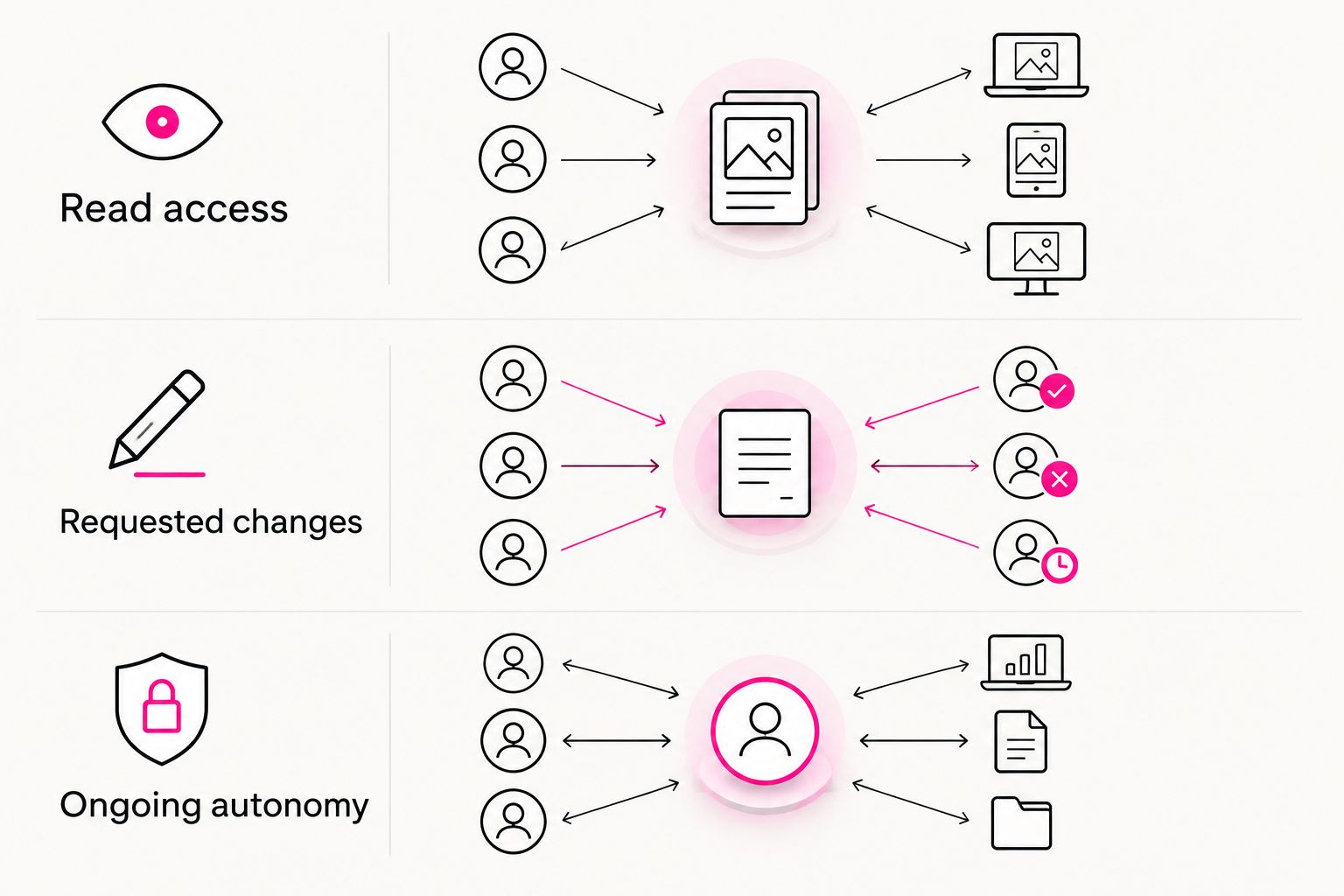
Separate reading, requested changes, and ongoing autonomy
These are different operating modes, not interchangeable descriptions of automation. Ask a prospective provider to demonstrate each mode you intend to use. Do not infer write access from a reporting demonstration.
Read access
Read access lets an assistant inspect information through a connection. A useful request identifies the account, the period, and the question you want answered. For example, ask it to explain which reported conversions it used rather than accepting an unexplained performance summary.
Reading is a sensible starting point because you can compare the response with the source account. It does not prove the assistant can make changes, and it does not authorize changes by itself.
Requested changes
Requested changes begin with an explicit instruction to perform a defined action. State the account, the target, the intended edit, and anything the assistant must leave untouched. Ask for the proposed change before execution when you need an approval checkpoint.
The distinction matters: approving an explanation is not the same as approving an account edit. Keep those decisions separate in your instructions and your evaluation of the software.
Ongoing autonomy
Ongoing autonomy gives software authority to act under continuing instructions rather than waiting for each individual request. Treat it as a separate decision with its own limits, review process, and stopping conditions. It should not be the assumed consequence of connecting an account.
Groas describes an explicit activation boundary: nothing runs until you switch it on. Its stated approach also logs actions with their reasons. Inspect those controls during setup rather than treating an activity log as a substitute for deciding what is allowed.
Give Google search and AI-answer discovery separate tests
Your marketing workflow should address both finding your business in Google search and understanding how assistants describe or recommend it. These are related discovery problems, but a result from one does not establish a result in the other.
Google search workflow
Start with a specific page and the search question it should answer. Inspect the evidence available to you, identify an edit, and decide who will publish it. Ask whether the connected software can perform that exact operation or only recommend it.
Keep the verification step separate from publishing. Confirming that page content changed establishes execution; it does not establish that rankings or business results improved. Evaluate those outcomes with the relevant search and business evidence.
AI-answer discovery workflow
Start with a buyer question and inspect the answer an assistant actually gives. Save the question, answer, and observation date so you can distinguish an observed mention from a general claim about visibility. Check whether the answer accurately describes your business.
For a 2026 software evaluation, distinguish observation from intervention. A tool that records answers performs a different job from a tool that helps change your content. Ask which part of that workflow it performs before giving it account access.
Why the right choice varies
Choose based on the work and authority involved, not a general preference for automation. These factors change the decision:
- Connection coverage: The agent needs access to the platform and operation your task requires. A connection to one account does not establish coverage elsewhere.
- Task clarity: A bounded edit is easier to authorize than an instruction to improve all marketing. Define the target and the intended result.
- Context requirements: Your business constraints still need to reach whoever performs the work, whether that is you or an assistant.
- Approval requirements: Some changes deserve an explicit review before execution. Decide where that checkpoint belongs.
- Verification needs: You need a way to inspect both the action performed and its later business effect. Those are separate checks.
- Work frequency: Recurring handoffs provide a different reason to connect tools than a task you rarely perform. Evaluate your actual routine.
How do you evaluate an agent before relying on it?
Use a task from your own account, with a narrow scope and an outcome you can inspect. This sequence is a buying test, not a claim about any provider's supported features.
- Define the task. Write the business question and identify the account involved. Avoid starting with an open-ended request to optimize everything.
- Inspect access. Check what the connection can read or change. Confirm that the permission scope matches the task you intend to delegate.
- Request the evidence. Ask the assistant to identify the information behind its recommendation. Compare that information with the source account.
- Approve the scope. State the exact action you authorize and what must remain unchanged. Resolve ambiguity before execution.
- Verify execution. Inspect the reported action and the destination account. Confirm what changed before evaluating whether the change helped.
Keep manual execution available until the connected workflow passes your inspection. You do not need to delegate every marketing activity to benefit from delegating a suitable task. A mixed workflow preserves direct handling where you want it.
Can you use an AI assistant without giving it write access?
Read access is a separate capability from permission to change an account. Choose a connection and permission configuration that match the analysis you want, and inspect that configuration before use. An assistant does not need unrestricted authority simply because you want help interpreting information.
Does manual marketing give you better control?
Manual marketing keeps execution directly with you. That is useful when you want to inspect every edit, but it also leaves the account-switching and implementation work in your hands. With an agent, control depends on the permissions, instructions, and checks you establish.
Should you automate paid ads and organic discovery together?
Evaluate paid ads, Google search, and AI-answer discovery as distinct workflows first. A shared assistant can be a common interface without making every workflow identical. In 2026, ask for a demonstration of each intended task instead of assuming that broad platform coverage proves detailed execution support.
FAQ
What's the main difference between AI marketing agents and manual marketing?
AI marketing agents can perform authorized tasks through connected tools; manual marketing leaves execution with you. An assistant that only writes advice does not remove the account-editing step.
Is Groas a chatbot or marketing software?
Groas is MCP-based marketing infrastructure that lets existing assistants work with connected marketing accounts. Its stated scope includes paid ads, SEO, and AI search.
Do I have to turn on autonomous marketing?
No—ongoing autonomy should be a separate decision from reading account information or requesting a specific change. Define the authority you want before enabling an operating mode.
Can I keep doing some marketing work manually?
Yes, you can keep manual execution for tasks you want to handle directly. Evaluate delegation task by task rather than treating it as an all-or-nothing choice.
How do I know an agent actually changed my account?
Check the execution record and inspect the destination account. A recommendation or conversational confirmation alone does not establish that the intended setting changed.
Is SEO reporting the same as improving visibility in AI answers?
No, SEO reporting and observed AI answers provide different evidence. Inspect Google search performance and saved assistant answers separately, and distinguish observations from changes made to your content.
What's the safest first task for a marketing agent?
Start with a narrowly scoped read-only assessment that you can compare with the source account. Evaluate requested changes separately after you understand the evidence and permissions.
One last thing
The most useful buying question is: what will I still have to do by hand? Ask it after the demonstration, not before. A polished answer can conceal the same copying, account switching, and editing you already do yourself.
For your 2026 decision, write down the remaining handoffs. Choose connected execution where it completes an authorized task you can verify; keep manual work where direct handling is the better fit.