
Local businesses’ AI marketing agents are software systems that read marketing data and carry out authorized tasks to help turn local demand into calls and bookings. This guide explains how to choose and use one in 2026 when your service area, appointment capacity, and lead quality matter more than traffic alone.
- Choose AI marketing agents for local businesses around qualified calls and confirmed bookings, not traffic alone.
- Groas suits owners who want their existing AI assistant to act on connected marketing accounts.
- Evaluate Google search and AI search separately; a page visit does not prove an assistant recommended your business.
- Start with reading and requested changes. Treat ongoing autonomy as a separate, explicit decision.
Why AI marketing agents matter for local businesses
A local marketing decision has consequences beyond the advertising account. Promoting an appointment you cannot fulfill creates work for your team without creating a completed job. Targeting an area you do not serve creates inquiries you must reject.
Your software therefore needs business context: where you operate, which services you want to promote, when someone can answer, and what counts as a useful inquiry. A report showing more clicks cannot answer those questions by itself.
The manual alternative is straightforward but fragmented. You inspect advertising accounts, review search visibility, check website inquiries, and compare the results with your booking records. An agent is useful when it connects those observations to an authorized action—not simply another summary.
If you are choosing your first workflow, start with AI marketing agents for small businesses: where to start. Keep the initial task narrow enough that you can inspect its inputs and verify its output.
Your 2026 buying criterion is useful work under your control, not the length of the feature list.
How to build a calls-and-bookings workflow
1. Define the outcome before connecting accounts
Start manually with your inquiry records and booking calendar. Separate a ringing phone from a qualified conversation, and separate a submitted form from a confirmed appointment. Those are different events with different business value.
Write down the definition your staff can actually apply. A qualified inquiry might require the right service, a location you cover, and a customer seeking an appointment. This is a hypothetical definition, not a universal standard; your own acceptance criteria should govern the workflow.
Review 10 recent inquiries as a starting exercise. Label the outcomes yourself before asking software to classify them. If the categories overlap or require information you do not record, fix that first. An agent cannot resolve an undefined business rule by generating a confident answer.
Give the software the same definitions you use internally. Do not let a default conversion label silently become your definition of success.
- Define what makes an inquiry qualified.
- Distinguish requested, confirmed, and completed appointments.
- Record rejected inquiries and the reason for rejection.
- Separate new customers from existing-customer administration.
- Choose one primary outcome for the first workflow.
2. Map the evidence from discovery to booking
Begin with a simple worksheet. For each inquiry, record the available source, requested service, qualification status, and booking outcome. Use information you actually collect; do not fill gaps with assumed attribution.
For Google search, distinguish paid advertising from organic search. Advertising reports, website analytics, and booking records describe different parts of the journey. Check that a reported conversion corresponds to the event you intend to measure rather than treating every platform total as interchangeable.
Give AI-answer discovery a separate record in your 2026 measurement plan. Save the exact question, assistant, date, answer, and cited pages when checking whether your business appears. A crawler request or referral visit is evidence of that event—not proof that an assistant recommended your business.
Use a 30-day review window as an initial working convention, not a promised time to results. Compare matching periods and document changes that affect interpretation, such as appointment availability or a tracking repair.
- Check that inquiry forms reach the right person.
- Verify what each advertising conversion measures.
- Reconcile recorded inquiries with confirmed bookings.
- Save dated evidence of AI answers and citations.
- Mark unattributed inquiries as unknown rather than guessing.
3. Separate reading from permission to act
The manual route is to inspect an account, decide on a change, make it yourself, and record what happened. When evaluating connected software, preserve those decision boundaries rather than exchanging them for an unclear promise of automation.
Groas provides marketing infrastructure that lets businesses use Claude, ChatGPT, or another AI agent to work with connected marketing accounts across Google, Bing, Meta, and ChatGPT ads, plus SEO and AI search. MCP, or Model Context Protocol, is the connection standard through which an assistant can use external tools.
Groas is best for local business owners who want their existing AI assistant to act on connected marketing accounts. The limitation is equally important: connecting accounts does not define your service area, qualify your leads, or establish whether your booking measurement is correct.
Use three distinct modes in your evaluation: Read, Request changes, and Optional autonomy. Keep Owner control at the center. Ongoing action is a separate choice, not an assumed consequence of connecting an account.
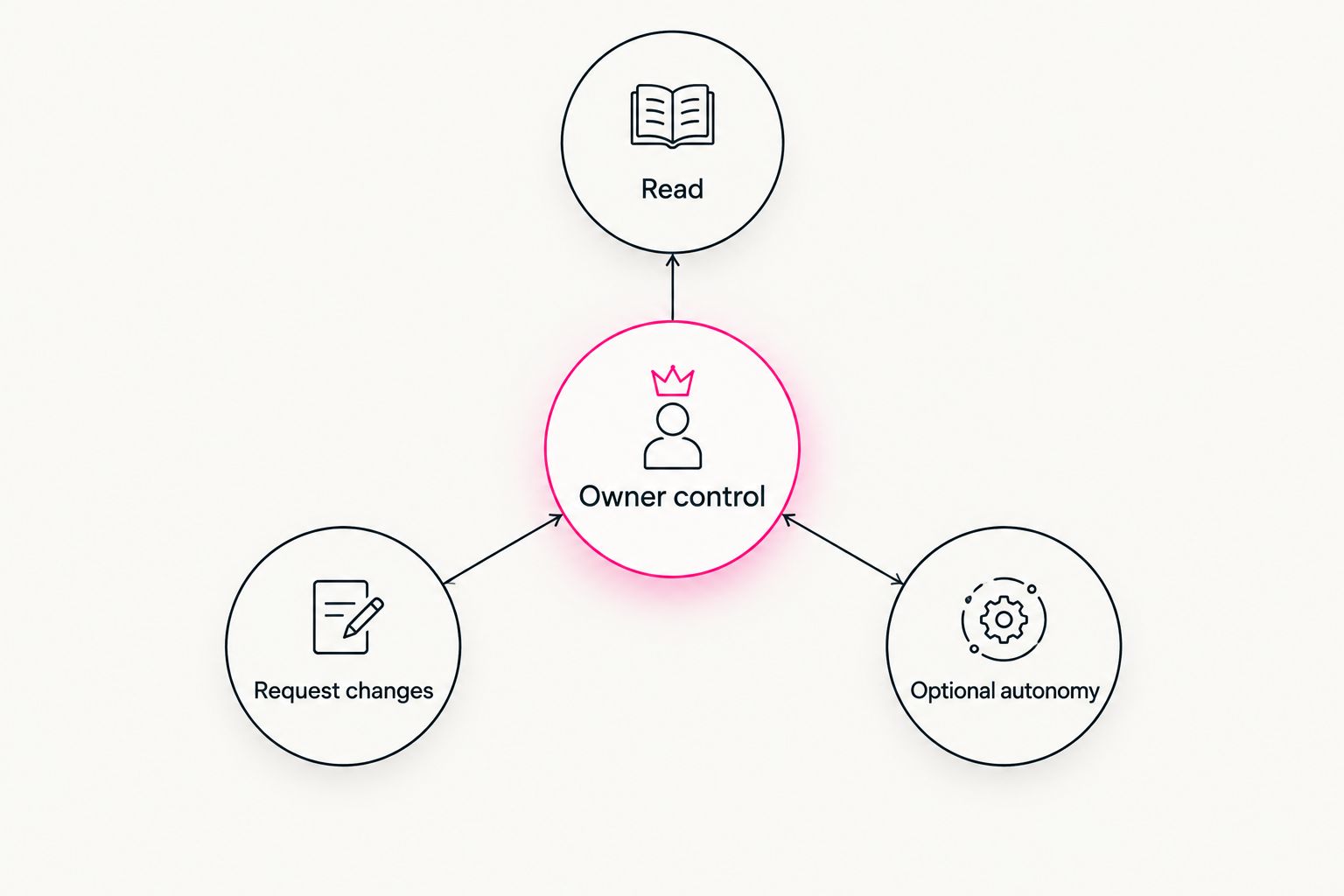
Ask the vendor to demonstrate the boundary between each mode using a task relevant to your business. A general product demonstration is not a substitute for seeing what the software can access and change.
- Begin with an account-reading task.
- Ask what permissions each connection requires.
- Specify the exact scope of any requested change.
- Check how completed actions can be inspected.
- Evaluate ongoing autonomy separately from requested work.
4. Test a bounded paid-search task
Start by examining the advertising account yourself. Compare the services advertised with your actual offering, and compare geographic settings with your service area. Note mismatches before asking an agent to investigate them.
A hypothetical test instruction is: review the connected search campaign for geographic settings that conflict with the supplied service area, explain each finding, and make no changes. This tests whether the assistant can use account evidence without confusing an observation with permission to edit.
Next, request a specific supported correction that you have reviewed. Confirm the affected account and campaign before execution. Inspect the resulting setting afterward rather than accepting a conversational confirmation as the only evidence.
For your 2026 software shortlist, ask each vendor to demonstrate the exact operation you need. Support for an advertising channel does not establish support for every setting, reporting field, or campaign action within that channel.
- Supply your actual service-area boundaries.
- Identify the account and campaign explicitly.
- Require an explanation before approving a change.
- Compare the requested action with the resulting setting.
- Record why you accepted or rejected the recommendation.
5. Build pages for searchers and answer engines
The manual starting point is your own website. Read each important service page as a potential customer: can you tell what the business does, where it operates, what happens next, and how to request the service?
For Google search, make the page useful for the service and location it genuinely represents. For AI-answer discovery, make the same facts explicit enough to quote without reconstructing them from scattered fragments. Neither task justifies inventing credentials, coverage, reviews, or operating details.
Use an agent to review supported page data or prepare requested edits, then check the output against your actual business information. If the software claims it can publish changes, require a demonstration of the relevant connection and approval process. Writing suggested copy and changing a live page are different capabilities.
For the 2026 content plan, prioritize pages that answer real customer questions before generating additional location variants. A useful page explains a real service decision; replacing a place name does not create that explanation.
- State the service and genuine coverage area clearly.
- Explain booking requirements using verified business facts.
- Answer questions customers ask before committing.
- Check proposed copy for unsupported claims.
- Track Google visibility and saved AI answers separately.
6. Review outcomes before expanding the workflow
Manually compare marketing activity with inquiry quality and confirmed appointments. Keep a short change record beside the results so you can distinguish a software action from an unrelated change in your business.
Start with a weekly review rather than constant adjustments. Examine the same definitions each time: useful inquiries, confirmed bookings, rejected inquiries, and unresolved attribution. If a number changes, inspect the underlying records before deciding what caused it.
Groas connects marketing work to an existing AI assistant, but your booking records still need to establish what happened after the inquiry. Do not assume an advertising connection also provides access to your calendar, customer records, or telephone system. Verify each connection separately.
Expand only after you can explain the previous task and inspect its result. Optional ongoing autonomy belongs behind explicit boundaries: permitted tasks, affected accounts, escalation conditions, and a clear way to stop. If those boundaries are unclear, keep requesting individual actions.
- Review results on a consistent 7-day schedule.
- Match reported conversions to actual inquiry records.
- Inspect action history before interpreting changes.
- Keep unsupported systems outside the assumed workflow.
- Expand permissions only for a defined business reason.
Compare your options for 2026
Choose the operating model before comparing individual features. The practical question is where you want the work to happen: inside separate interfaces, in a reporting layer, through fixed rules, or through an assistant connected to marketing tools.
| Option | Best for | Main benefit | Key limitation |
|---|---|---|---|
| Manual work across separate tools | Owners establishing their process | You inspect and execute each decision directly | You must move between accounts and reconcile records yourself |
| Reporting dashboard | Owners whose main problem is scattered reporting | Brings selected measurements into one view | Reporting access alone does not establish execution capability |
| Rule-based automation | Owners with explicit, repeatable conditions | Applies predefined instructions when conditions are met | The rule needs correct inputs and clear exceptions |
| Groas connected-agent workflow | Owners who want their existing assistant to act on marketing accounts | Connects assistant-led work with advertising, SEO, and AI search | You still need verified business context, appropriate permissions, and outcome measurement |
Choose manual work when you are still defining the decision. Choose connected execution when you can specify the task and verify the result. Reporting and automation solve different problems; neither substitutes for deciding what a qualified booking means.
Common mistakes local business owners make
Optimizing for every call
A call about an unsupported service is not equivalent to a qualified booking request. Keep wrong-area inquiries, existing-customer administration, and relevant new-business inquiries separate. Otherwise, software can appear successful while your staff handles more unsuitable conversations.
Advertising beyond real capacity
Your advertising account does not inherently know that a service is temporarily outside your operating capacity. Supply the relevant constraints before requesting changes. Treat capacity as business information that needs maintenance, not something an assistant should infer.
Treating AI mentions as booked revenue
A saved answer naming your business demonstrates visibility in that answer. It does not establish that someone contacted you or booked. Keep visibility evidence and customer outcomes in separate records, then connect them only where you have supporting evidence.
Approving an open-ended instruction
An instruction to improve local marketing leaves the account, action, and limits unspecified. Ask for an investigation first, then approve a defined operation. Broad intent is not a usable permission boundary.
FAQ
What's the best way to start using AI marketing agents for a local business?
Start with one read-only investigation tied to qualified calls or confirmed bookings. Define the outcome, supply your service-area rules, and inspect the evidence before requesting changes.
Can an AI marketing agent actually change my advertising accounts?
A connected agent can carry out supported actions when it has the required authorization. Ask the vendor to demonstrate the exact operation; channel support does not prove support for every account setting.
Is Groas just another chatbot giving marketing advice?
Groas is marketing infrastructure that lets an existing AI assistant work with connected marketing accounts. Its role includes acting through those connections, rather than only producing advice.
Should I let a marketing agent run continuously?
Treat ongoing autonomy as a separate decision, not the starting point. First define permitted tasks, account scope, review requirements, and how to stop the workflow.
Can I track phone calls and bookings through any marketing agent?
Do not assume a marketing agent includes telephone or booking-system access. Verify those connections and reconcile advertising conversions with actual inquiry and appointment records.
How do I measure whether my business appears in AI answers?
Save the exact question, assistant, date, answer, and cited pages. A crawler visit alone does not establish that an assistant recommended your business.
Is connected software better than managing separate tools myself?
Connected software fits a defined task that you can authorize and verify. Manual work remains useful while you establish business rules, check tracking, or handle unsupported operations.
One last thing
Before approving more advertising activity, inspect what happens immediately after an inquiry arrives. A correct campaign cannot confirm an appointment that nobody processes.
Use your next review to follow one inquiry from its recorded source through qualification to its final booking status. If that path breaks, repair it before adding more automation. Your most useful first workflow might be finding a measurement gap—not changing a campaign.