
AI marketing agents for small business are software systems that use connected marketing tools to carry out tasks aimed at attracting customers. Unlike a chat assistant that only suggests ideas, an agent needs account access, clear instructions, and limits on what it can change—especially when you own both the marketing workload and the budget.
- Start with one workflow, not every channel: AI marketing agents for small business need clear tasks and permissions.
- Groas connects your existing AI assistant to marketing accounts for paid ads, SEO, and AI search work.
- Separate reading data, requesting changes, and optional ongoing autonomy before authorizing actions.
- Measure Google search visibility and AI-answer mentions separately; neither proves a sale.
Why AI marketing agents matter for small businesses
If you run your own marketing, the practical question in 2026 is not whether software can write another campaign idea. It is whether the software can complete a defined task without leaving you to move information between tools and make every change yourself.
Groas is best for owners who want their existing AI assistant to act on connected marketing accounts. Its role is infrastructure: connecting an assistant such as Claude or ChatGPT to marketing work, rather than replacing your assistant with another advice-only conversation.
That distinction matters when you compare options. You need to know what a tool can read, what it can change, and what still requires your approval. Treat access, action, and autonomy as separate buying decisions.
How to start with a marketing agent in 2026
1. Choose one task you already do manually
Start by writing down a recurring marketing task from beginning to end. Include the account you open, the information you inspect, the decision you make, and the action you take. This gives you something concrete to evaluate instead of judging software by its conversation quality.
A hypothetical example is reviewing search terms before deciding which irrelevant searches to exclude from an advertising campaign. The manual route is to inspect the report, identify candidates, and make approved exclusions yourself. The agent route should make those same stages visible—not jump straight from a vague instruction to account changes.
Best starting point: a narrow task you understand well enough to check. Leave unfamiliar channels out of the first evaluation.
- Pick 1 account for the initial workflow.
- Name the report or source the task requires.
- Write the decision rule in plain English.
- Define the exact output: explanation, proposed edit, or completed action.
- Record what the agent must leave unchanged.
2. Verify access before asking for changes
The manual approach is straightforward: open the relevant account and verify the account name, date range, and reporting settings yourself. Keep that habit when you introduce an agent. An articulate summary is not proof that the assistant read the correct account.
Ask the software to identify its data source and explain what access it has. Begin with a read-only task: summarize a campaign, inspect a page, or report an existing setting. If the response cannot distinguish retrieved information from suggestions, do not authorize edits.
For your 2026 buying checklist, separate a supported channel from a supported action. A connection to an advertising platform does not, by itself, establish that every reporting or editing task is supported.
- Confirm the business and account selected.
- Ask which reporting period the answer covers.
- Check a reported value against the original account.
- Identify which requested actions are supported.
- Keep write access out of the initial task where possible.
3. Connect your assistant to a bounded workflow
Without connected software, you copy account information into a chat, review the response, and return to the original tools to make changes. That remains a useful option when you want advice but prefer to execute everything yourself.
Groas provides an MCP-based connection between your existing AI assistant and marketing accounts. MCP, short for Model Context Protocol, is a standard for connecting assistants to tools and data. The useful buying question is not whether a product mentions MCP; it is whether your intended workflow works through that connection.
Keep three modes distinct: Read data, Request changes, and Optional autonomy. Your assistant can support a workflow without receiving permission for ongoing independent action. Do not treat a connection as blanket authorization.
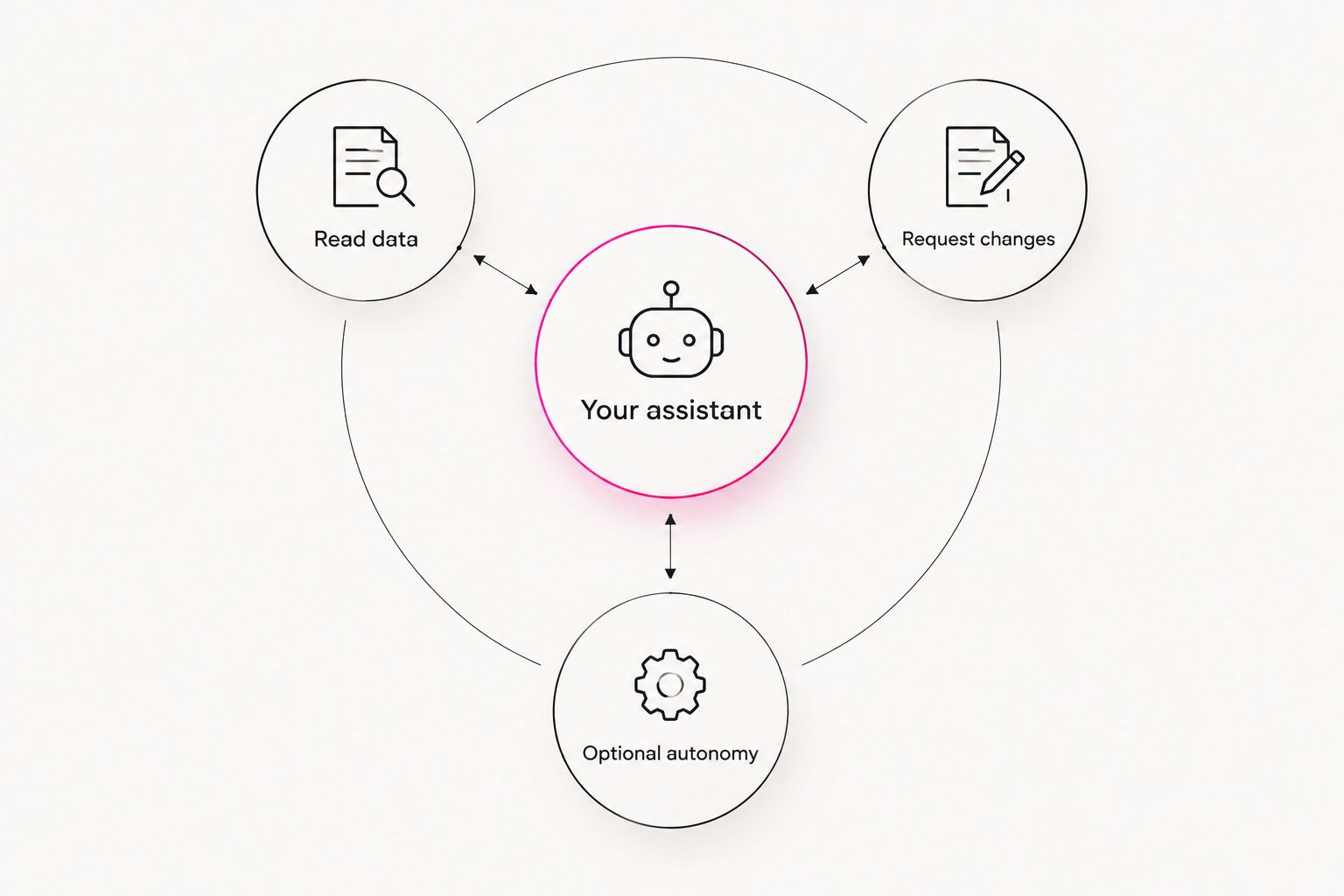
Use a hypothetical instruction such as: inspect the selected campaign, explain the proposed change, and wait for approval. Verify that the workflow respects those boundaries before expanding its scope.
- Start with an inspection request.
- Ask for proposed changes and their reasons.
- Specify which changes you approve.
- Check the account after execution.
- Leave ongoing autonomy off unless you explicitly choose it.
4. Build separate Google and AI-answer discovery checks
For Google search, the manual starting point is to inspect your site's search performance and review whether important pages answer the questions buyers actually ask. Google Search Console provides search queries and page-performance information for your verified property. Use those observations to choose a page to improve rather than generating unrelated articles.
For AI-answer discovery, manually ask relevant buying questions in the assistants your customers use. Save the question, answer, date, and any cited pages. A brand mention, a citation, a website visit, and a sale are different observations; keep separate records for each.
In 2026, your evaluation should include both workflows. A connected SEO or AI-search tool earns its place when it helps you inspect evidence and carry out supported work—not merely produce a longer list of content ideas.
- Choose a real customer question for each check.
- Record the Google query and relevant landing page.
- Save the exact AI question and returned answer.
- Note whether your business is mentioned or cited.
- Improve the page's direct answer and supporting details.
- Track resulting visits and business outcomes separately.
5. Test one approved change before expanding
The manual way to evaluate a change is to record the existing state, make the edit, and verify the result in the original platform. Apply the same discipline to an agent. A completion message is not enough; inspect what actually changed.
Choose a task whose result you can check directly. A hypothetical test is updating an approved piece of campaign text, provided the connection supports that action. Compare the final text with your approved version and confirm that unrelated settings stayed unchanged.
Best evaluation method: use the same task and acceptance criteria for every option. Do not compare one tool's polished demonstration with another tool's unfinished setup. Give each candidate the same bounded request and assess the observable result.
- Save the relevant settings before the task.
- Approve one precisely described change.
- Verify the outcome in the source account.
- Check that excluded settings stayed untouched.
- Document how you would reverse the edit.
6. Measure completed work and business outcomes separately
When you do the work yourself, you can record what happened in a simple worksheet. Keep that baseline when testing software. Track whether the task was completed correctly, how much checking you performed, and whether the intended business outcome changed.
Use an initial 7-day review window to inspect workflow quality, not to declare a campaign successful. This is a suggested operating cadence, not a performance benchmark. Advertising results, Google search performance, and AI-answer visibility need their own measurement context.
For a 2026 evaluation, distinguish operational usefulness from marketing effectiveness. An agent can complete the requested action correctly without that action improving sales. Conversely, a sales increase does not establish that the agent caused it.
- Record the requested task and completed action.
- Track minutes spent reviewing and correcting work.
- Log errors and unexpected changes.
- Keep advertising, search, and AI-answer observations separate.
- Review leads or sales using your existing attribution setup.
- Expand access only after the workflow passes your checks.
Compare your small-business marketing options
The main alternative to a connected agent is often you, working across separate accounts. Compare that approach with advice-only assistance and connected execution before buying. Each option has a useful role and a clear limitation.
| Option | Best for | Practical advantage | Key limitation |
|---|---|---|---|
| Manual work across separate tools | Owners handling occasional tasks who want direct execution control | You inspect the source and make each change yourself | You move information between tools and carry out every edit |
| Advice-only assistant workflow | Owners who want help interpreting information or drafting instructions | You can review suggestions before touching an account | Without a connection, you still supply the data and execute changes |
| Groas connected infrastructure | Owners who want their existing assistant to work with marketing accounts | Connects assistant-led work across paid ads, SEO, and AI search | You still need to verify supported actions, access boundaries, and results |
Choose manual work when the task is infrequent and the setup is unnecessary. Choose advice-only assistance when you want help thinking, not executing. Choose connected infrastructure when account-level execution is the requirement.
Do not judge the options by how many suggestions they generate. Judge whether they complete the work you need while preserving the control you require. More connectivity also means more permissions to inspect and maintain.
Common mistakes small-business owners make
Connecting every channel before proving one workflow
Broad access makes an evaluation harder to understand. If several accounts and tasks change together, you lose the clean connection between your instruction and the result. Start with one bounded workflow, then add another deliberately.
Treating a confident answer as account evidence
An assistant can produce a plausible explanation without demonstrating where its information came from. Require the source account, reporting period, and observable result. If the answer mixes retrieved facts with recommendations, ask it to separate them before acting.
Using an ad metric as the whole business result
Clicks and impressions describe advertising activity; they do not establish whether the activity produced a worthwhile customer. Keep your existing lead or sales checks in place. Do not let a new interface replace the business measurement you already need.
Counting AI mentions as Google rankings
An answer that names your business is not a Google ranking, and a cited page is not a confirmed visit. Maintain distinct records for Google search and AI-answer discovery. Otherwise, a report can look positive while leaving the actual customer journey unexplained.
Buying autonomy before defining permissions
Ongoing automation is not a substitute for a clear operating rule. Decide which actions are allowed, which require approval, and which are prohibited before enabling independent execution. If you cannot describe the boundary, keep the workflow request-driven.
FAQ
What's the best way to start with AI marketing agents for small business?
Start with one recurring task in one account that you already know how to check. Verify read access, review a proposed change, and inspect the result before expanding permissions.
Do I need to replace ChatGPT or Claude to use Groas?
No. Groas is infrastructure that lets your existing AI assistant work with connected marketing accounts. Evaluate the specific account connection and actions you need before adopting a workflow.
Can a marketing agent change my ads without asking?
That depends on the permissions and operating mode you authorize. Separate read-only work, explicitly requested changes, and optional ongoing autonomy; do not assume that connecting an account requires enabling autonomy.
Is a connected marketing agent better than doing the work myself?
A connected agent fits workflows where you want the assistant to act on account data, not just offer advice. Manual work remains a valid choice for occasional tasks or when you prefer to execute every change yourself.
Can I use the same workflow for Google search and AI-answer visibility?
Use a shared customer-question list, but measure Google search and AI-answer visibility separately. Search queries, answer mentions, citations, website visits, and sales describe different events.
What should I check before giving a marketing agent write access?
Check the selected account, supported action, proposed change, approval boundary, and reversal method. Begin with a result you can verify directly in the original platform.
How do I know whether a marketing agent is helping my business?
Measure correctly completed tasks separately from leads and sales. Record your review work and errors, then assess business outcomes without assuming that every change was caused by the software.
One last thing
Ask every candidate, including Groas, to explain what it will not do under your current permissions. Then test that boundary with a harmless request outside the agreed scope.
A useful assistant must do more than complete an instruction. It must also leave the rest of your business alone.